Invoices and receipts
Every purchase is a QuickBooks invoice. Find each one on the Invoices page, read its status, pay an open one, and download QuickBooks' own invoice and receipt PDFs.
QuickBooks, by Intuit, is how you pay. Each bundle of credits you buy is one QuickBooks invoice, and each campaign line number has its own monthly invoice. The Invoices page lists every one, with its status as QuickBooks reports it.
Before you start
Anyone on the workspace can open Invoices and download every PDF.
Only the account owner pays. A Member or an Admin sees Pay now greyed out, with "The account owner pays the invoices". For a dealer group, see Billing across stores.
Find an invoice
Open Billing in the sidebar, then Invoices. The Credits page also has an Invoices door at the top.
 Example
What you see
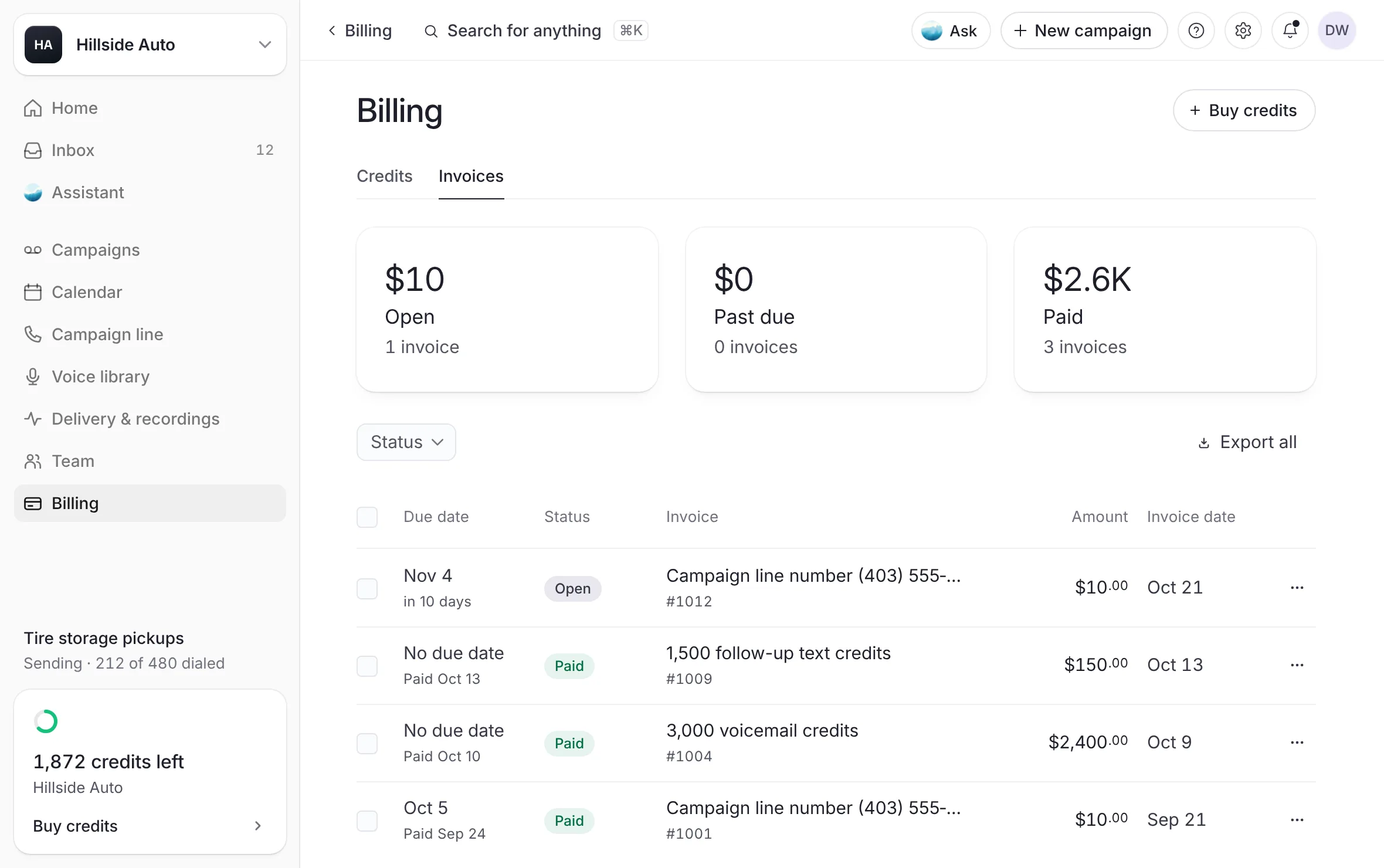
the cards Open, Past due and Paid, each with its total and its count of invoices. Under them, the Status filter, Export all, and the table: Due date, Status, Invoice, Amount and Invoice date. A line under the table says "Every invoice we've sent you, with its status as QuickBooks reports it."
To list only some invoices, select a card, or open Status and tick Open, Past due, Paid or Voided. Reset shows every invoice again.
Select an invoice's row to open it beside the list.
What you see
the invoice's status, its amount and its timeline: Invoice issued, then its due date, Past due, Paid or Voided. Then View invoice (or View receipt once it is paid), Pay now while it is open, the details (For, Credits or Period, Due date, Invoice date, Invoice no.), and Invoice documents with its PDFs.
While an invoice is open beside the list, the up and down arrow keys step through the list, and Escape closes it.
What each status means
| Status | What it means |
|---|---|
| Open | Not paid yet. The Open card and filter include past-due invoices. |
| Past due | Not paid, and past its due date. |
| Paid | Paid, as QuickBooks reports it. |
| Voided | Voided in QuickBooks. Nothing is owed on it. |
A bundle invoice shows No due date in the Due date column. A campaign line number's invoice has a due date. See Paying for your campaign line.
What the Invoice column says
A bundle reads as its credits, for example "3,000 voicemail credits".
A campaign line number reads "Campaign line number", the number, and the month it pays for.
View an invoice or its receipt
Open Billing, then Invoices.
Select the ⋮ key at the end of the invoice's row.
Select View invoice, or View receipt for a paid one.
What you see
a window with the invoice's details on the left and QuickBooks' own copy on the right, the same document as its PDF. For an open invoice the window is titled Invoice and its number, shows the invoice, and has PDF and Pay now. For a paid invoice it is titled Receipt for invoice and its number, shows QuickBooks' receipt for the payment, and has Invoice PDF and Receipt PDF. Open full size under the copy opens the same PDF on its own in a new tab, or downloads it where your browser has no PDF viewer. It is easier to read that way on a phone. If QuickBooks can't be reached, the window says so and offers Try again.
Download an invoice or a receipt
Open Billing, then Invoices.
Select the ⋮ key on the invoice's row.
Select Invoice PDF, or Receipt PDF for a paid invoice.
Every PDF is QuickBooks' own copy. It saves as "The Call Guy invoice" or "The Call Guy receipt", followed by the invoice number.
Other ways to the same PDFs:
In the open invoice's panel, under Invoice documents, select a file to download it.
On the Credits page, Last paid shows the amount of your newest paid invoice. Select the amount to download its receipt.
In your credit activity, a paid bundle's ⋮ key holds Download the receipt. See Your balance and credit activity.
Several at once
Tick the invoices' rows on the Invoices page. The box in the table's head ticks every invoice shown.
In the bar that appears, select Download PDFs (Download PDF for one). The bar also shows their total and a key to export them as a CSV file.
Pay an open invoice
Open Billing, then Invoices.
Select the ⋮ key on the open invoice's row, then Pay now. Or open the invoice and select Pay now in its panel.
Pay the invoice on Intuit's QuickBooks page, which opens in a new tab.
What you see
the list keeps checking on its own, and the invoice reads Paid once QuickBooks confirms the payment. For a bundle, the credits land on your balance once QuickBooks confirms the payment.
The bell also lists every open invoice for the account owner, with Open the invoice.
Export the list
Export all saves the invoices as a CSV file. With a filter on, it reads Export filtered. With rows ticked, it exports only those.
The file's columns are Invoice no., For, Status, Amount, Currency, Invoice date, Due date and Paid date.
Good to know
Prices are before tax. Each invoice adds GST or HST by the province on file for your account. See Bundles and prices.
Invoices go to your account's email. The Credits page says where, under How you pay: QuickBooks.
A store added to a dealer group without an email of its own has its invoices sent to its Store email, on the store's page in Settings, or to the group owner's email until one is added. See The store's email.
Each bundle invoice carries a note: a prepayment for credits that are spent only on delivered voicemails and never expire, with a link to your terms at thecallguy.ca/terms.
A receipt exists only once an invoice is paid. Before that, its PDF is the invoice itself.
An invoice our team makes for you by hand in QuickBooks can be added to this page too. It reads Paid or Voided on its own once QuickBooks says so, the same as any other invoice. Paying it adds no credits by itself: the credits it covers are added by our team.
You cannot void an invoice from the dashboard. If you no longer want a bundle you asked for, write to contact@thecallguy.ca.
If the list cannot be read, the page says "Your invoices couldn't be read", with Try again. It never shows an empty list in its place.
Related
Last updated October 21, 2026
Was this helpful?