Check a phone, and send a test call
Have your campaign line call a callback phone and ask for 1, so you know it reaches a person, and send a test call that plays a short recorded message.
Two short calls from your campaign line prove a callback phone works before a customer needs it. A check call asks whoever answers to press 1, and marks the phone Checked. A test call plays a short recorded message, so you hear what reaches that phone.
Before you start
You need an active campaign line. A check call and a test call both come from it. See Get a number.
The workspace owner and admins check phones. A test call can be sent by anyone who sees the Send a test call button.
The phone must be on your callback list. See Callback numbers and where calls ring.
Check a phone
A new phone is checked the moment you add it on the Callbacks tab.
Open Campaign line in the sidebar.
Select the Callbacks tab.
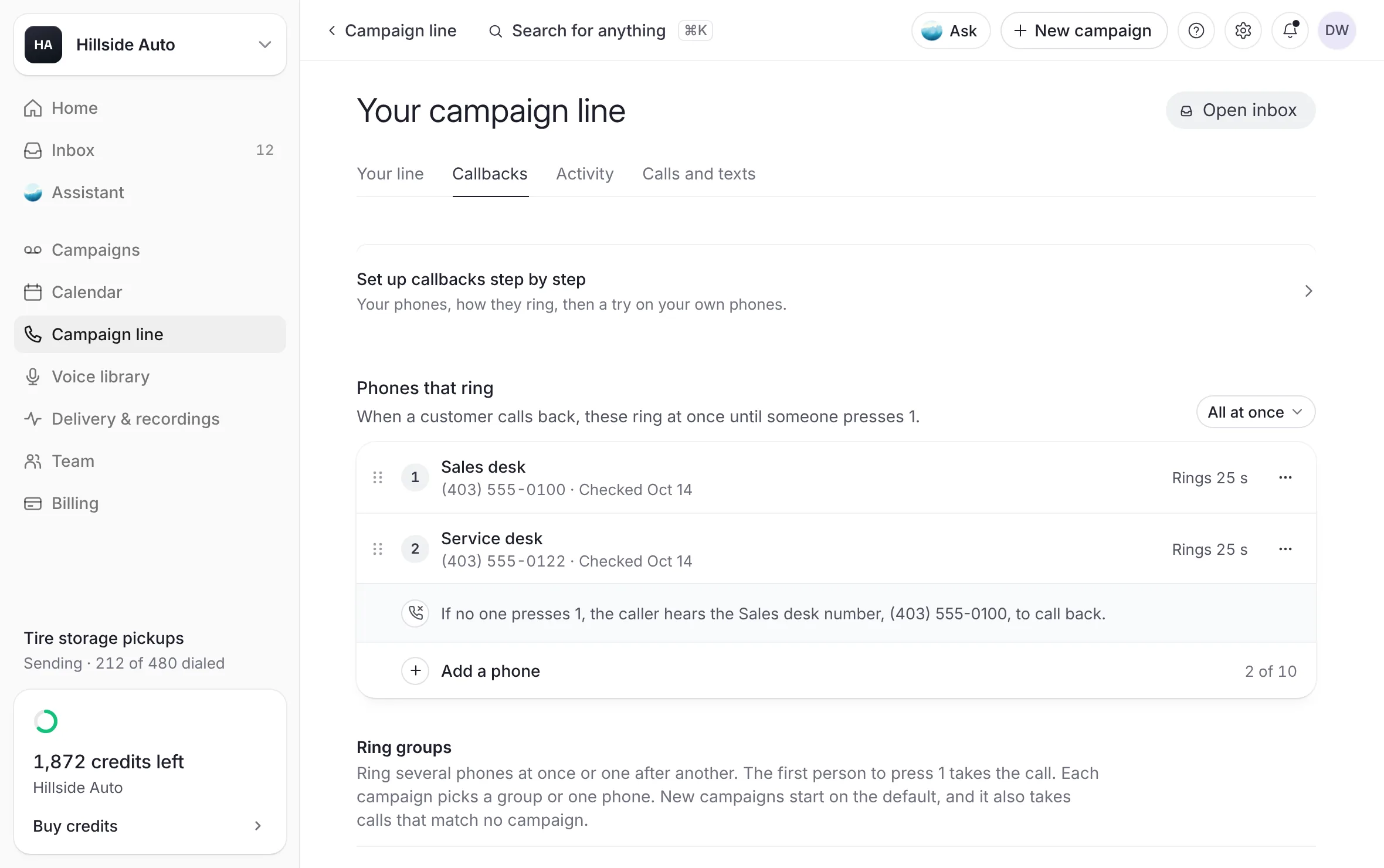 Example
Under Add a phone, type a Name (for example "BDC desk") and the Number.
Select Call to check.
What you see
the phone joins Phones that ring, and a notice says the line is calling it now: answer it and press 1. The row wears the tag Answer and press 1 until the check ends.
Answer the phone. You hear that The Call Guy is checking this phone for your business's callbacks, and you are asked to press 1.
Press 1. The line says "Thanks, this phone is checked. Goodbye." and hangs up.
What you see
the row reads Checked with the date.
To check a phone again, select Call to check (or Call again) on its row, or open the More button (three dots) on the row and select Call to check.
What the row says
| The row reads | What happened |
|---|---|
| Checked with a date | Someone answered and pressed 1. |
| Answer and press 1 | The check call is ringing now. |
| Not checked, with "No 1 came back. Call again when someone can answer." | Nobody answered, voicemail picked up, someone hung up, or no 1 came. |
| Not checked yet | The phone has never been checked. |
The check rings for up to 30 seconds. Once answered, there are 10 seconds to press 1.
A check is information only. A phone that is not checked still rings for your callbacks.
If voicemail picks up the check, call again when someone can answer.
A checked phone can still go to voicemail on a real callback. To make a phone ask whoever answers to press 1 on every callback, see Ask one phone to press 1. A ring group always asks.
Send a test call
A test call rings one of your callback numbers from your campaign line and, once you answer, plays a short recorded message in a house voice, then hangs up.
From the line's settings:
Open Campaign line in the sidebar.
Select the Calls and texts tab.
Under Test call, select Send a test call.
What you see
Calling… while it dials, and a notice that names the phone being called and the line it comes from. Your Send callbacks to phone rings.
From your callback numbers:
Select Settings in the top bar, then your business's name.
Under Callback numbers, select the More button (three dots) on a number's row.
Select Send a test call.
The message says it is a test call from The Call Guy, that your campaign line reached this phone, and that callbacks forwarded there will ring through.
The test call shows your campaign line's own number on the phone. A real callback shows the customer's number.
On Calls and texts, save any change to Send callbacks to first. Until you do, the row says Save your changes first, then send a test call.
A test call is not a callback. It is not counted in your callback figures.
The guided setup on the Callbacks tab ends with Try it: a test ring of the ring group you just set up, the way a customer's callback would ring it. Without a ring group, it is this test call to your default phone. See One phone, or a ring group.
How many calls you can send
Check calls and test calls each have their own count, held per login and per workspace each hour. When you reach a limit, the dashboard says so:
Three check calls an hour. Try again later. or Your team has placed six check calls this hour. Try again later.
Three test calls an hour. Try again later. or Your team has placed six test calls this hour. Try again later.
When a call does not go
The dashboard says why, for example:
"The test call comes from your campaign line. Set one up first." or "The check call comes from your campaign line. Set one up first.": you have no number yet.
"Your campaign line is still being set up. Try again in a few minutes."
A test call can only ring a number on your callback list.
If your callbacks ring through a phone setup managed outside the dashboard, the Callbacks tab says so and offers no checks or test calls. Talk to the team behind The Call Guy.
Related
Last updated October 19, 2026
Was this helpful?