Record your own voice
Clone your voice or your team's from one short read in the voice studio, with permission, and use it in any campaign.
Your voicemails can speak in your voice or your team's. You read one short script in the voice studio, and a clone of the voice is built and saved to your voice library, ready for any campaign. Cloning spends no credits.
Before you start
Your email is confirmed, and your balance holds credits. The studio opens once a bundle is on your balance. See Buy credits.
Your business is in Canada.
A slot is free. Every account includes 3 cloned voices. See Remove a voice to free one.
The voice is yours, or you have the speaker's permission. To clone a teammate, the simplest way is to invite them to record it themselves. See Voice cloning rules.
Find somewhere quiet, and use your device's own microphone. Bluetooth earbuds lower the quality.
Start a new voice
Select Voice library in the sidebar.
Select Add a voice. In the builder's voice picker, Clone a voice opens the same place.
In New voice, type Whose voice is this?: yours, or your teammate's. It labels the voice in your library.
Tick This is my own voice, or I have this person's permission to clone it.
Select Continue.
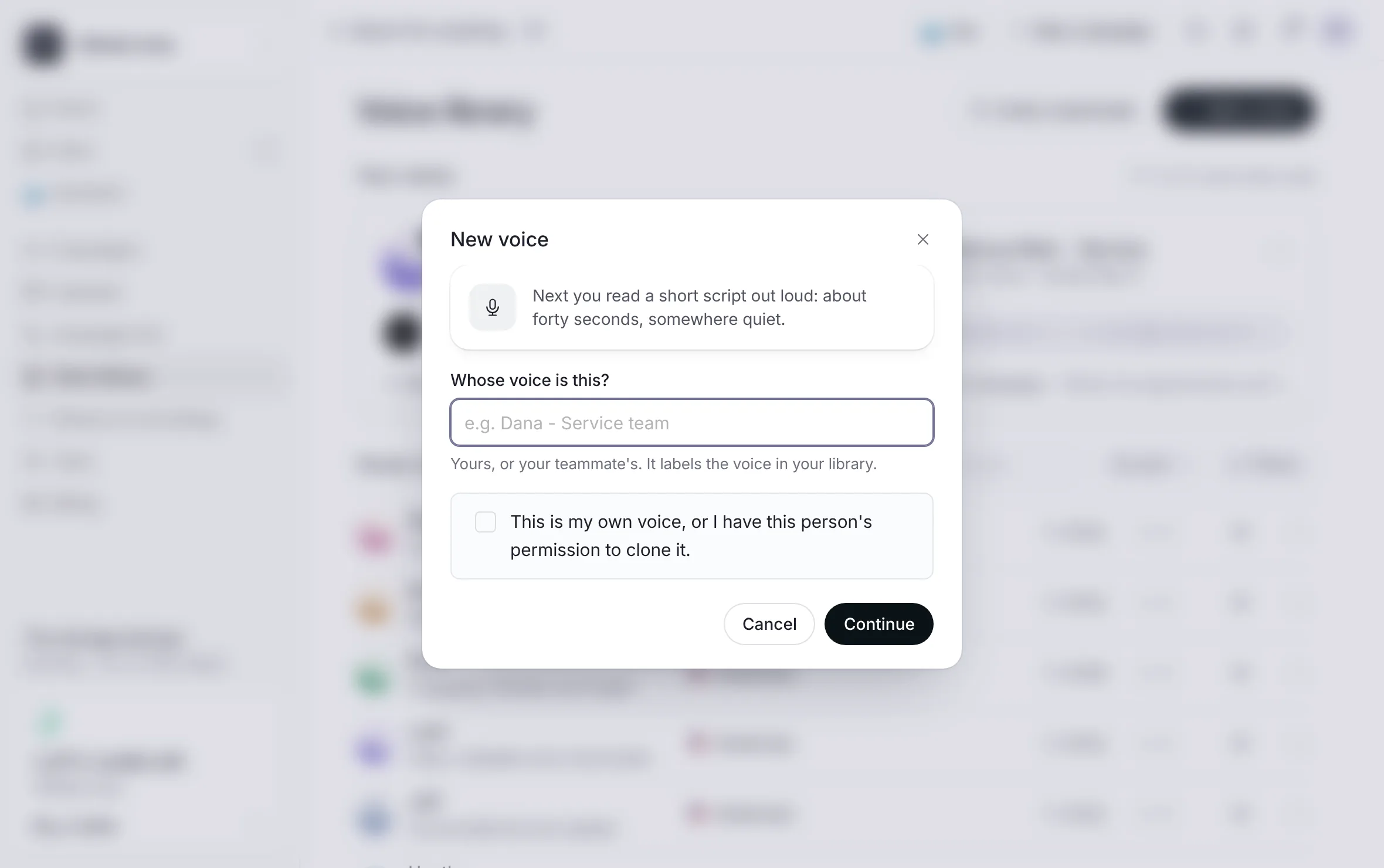 Example
What you see
A line saying what comes next: a short script to read out loud, about forty seconds, somewhere quiet.
Read the script
On Read this out loud, select Start recording.
After a short count, read the script on screen at your own pace.
The recording stops by itself when you finish the script. You can also select Finish recording.
What you see
The script in large type. Each word waits in gray, and the ink runs through the word you are saying as you read.
Hear it back
On Hear it back, play your take.
Read its checks:
Clear: whether your voice came through on a full-quality microphone.
Long enough: how many seconds of clear speech the take holds.
Quiet room: whether background sound came through under your voice.
Select Record again to try once more, or Use this take.
What you see
The library comes back, and your new voice shows in it while it is built: Uploading your take, then Learning your voice, then Ready. Then a page shows the voice with a play button and "Cloned voice, saved to your library".
Select Use this voice to start a campaign with it, or Back to the library.
If the sample on that page did not play, select Try the sample again. The voice is saved either way.
What the studio checks
A take under 30 seconds is refused. Read the full script, so the clone has enough to learn from.
If the studio could not hear you, Clear says to check which microphone is selected and record again.
The permission box is required. Your answer is sent and kept with the voice, and the take is kept with the voice as the record.
Closing the studio before you use the take asks first, because the take would be lost.
When the studio does not open
| The studio says | What to do |
|---|---|
| Verify your email to clone a voice | Confirm your email with the link we sent you. Open settings takes you to your settings. See Confirm your email. |
| Add credits to clone a voice | Buy a bundle with Buy a bundle. Cloning itself spends no credits. |
| Your included voices are in use | Select Review your voices and remove one, or ask about an extra voice. |
| Voice cloning opens when we open up where you are | Voice cloning is for businesses in Canada. |
Your voice slots
Every account includes 3 cloned voices. The library shows how many slots are used.
An extra voice past the included 3 is $15 CAD, one time, by asking us. When your slots are full, the studio offers Ask about an extra voice, which emails the team.
Each account can try a clone up to 5 times a day. A clean take usually lands in one or two tries.
If new voices are paused for a while, the studio says so, and until when if it knows. Every voice you already have keeps working, and so do the house voices. See New voices are paused.
Good to know
Voices are cloned only with the speaker's permission and never shared between clients.
Your voice is used only for your account's campaigns. You can remove it at any time.
Credits are spent only on delivered voicemails. See How credits work.
Related
Last updated October 19, 2026
Was this helpful?