Paying for your campaign line
Each campaign line number is $10 a month on its own QuickBooks invoice. How that invoice, its reminders, a renewal and a release work.
Your campaign line number is the only charge that repeats each month. Each number is $10 a month, on its own QuickBooks invoice, and it is never taken from your credits.
What a campaign line number does, and how to choose one, is in What the campaign line is and Get a number.
Before you start
Only the account owner adds, pays for or releases a number. A Member or an Admin reads "Your workspace owner can add, release or pay for a number.", and their Pay now is greyed out. For a dealer group's stores, see Billing across stores.
What a number costs
$10 a month for each number. Every number is the same price.
Up to 5 numbers on an account. The Campaign line page counts them under Add a number, with "Each is $10 a month, on a monthly invoice."
Its own invoice. A number's month is billed on its own QuickBooks invoice, never from your credits.
Plus GST or HST. The price is before tax. The invoice adds GST or HST by the province on file for your account, as a bundle's does. See Bundles and prices.
How a number's month is billed
You choose a number. It is active at once, and QuickBooks emails the first month's invoice the same day.
The invoice is due 14 days after it is issued.
While it is open, a reminder email comes on day 7 after the invoice was issued and a second on day 12, which names the day the number would be released. Each has a Pay the invoice button, or Open Billing when the payment link is not available.
Once it is paid, the number reads Paid. The next month's invoice comes on the day the paid month ends.
Past its due date the number keeps working: callbacks still ring and follow-up texts still go. A last reminder comes on day 38 and names the release date. If the invoice is still unpaid 45 days after it was issued, the number is released at the end of that day. Its follow-up texts stop, and the open invoice is voided: there is nothing to pay. You get an email saying the number was released.
What you see
on the Campaign line page, the table Number, Each month and Callbacks ring. Under Each month, each number shows its state, its price and a sentence, such as "Paid through" a date, "The next invoice comes that day".
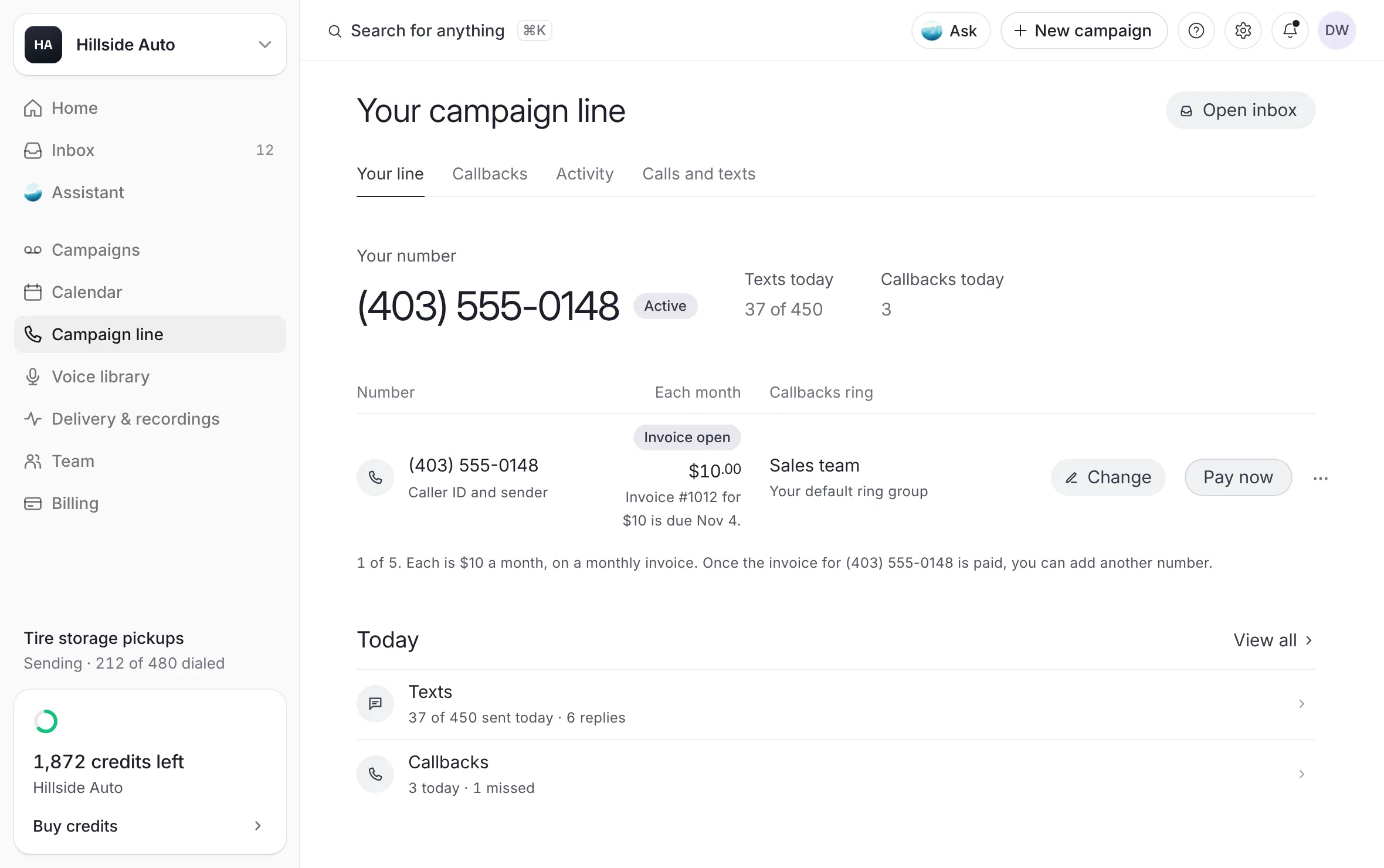 Example
Each state a number can show
| State | What it means |
|---|---|
| Setting up | The number is not active yet. Billing starts the moment it is. |
| Invoice open | This month's invoice is waiting. The row says its number, its amount and its due date. |
| Past due | The due date has passed and the number still works. The row says the day to pay by to keep the number. |
| Paid | Paid through a date. The next invoice comes that day. |
| Released | The number is no longer on your line. The row says whether it was released for an unpaid invoice, by you, or by the team behind The Call Guy. |
Pay a number's invoice
Open Campaign line in the sidebar.
While the number's invoice is open, select Pay now on its row. Intuit's QuickBooks page opens in a new tab.
Pay the invoice there.
What you see
once QuickBooks confirms the payment, the row reads Paid.
The same invoice can also be paid:
On the Credits page, from the bill on the right. It reads Invoice due or Past due, with the date. Its ··· key holds Pay now, View invoice and Download PDF.
On the Invoices page, from the invoice's ⋮ key. See Invoices and receipts.
From the reminder email's Pay the invoice button.
The bell also lists the open invoice for the account owner, with Open the invoice.
When no number's invoice is open, the bill on the Credits page shows the next one instead, as Next bill with its date and its price for each number.
Release a number
Releasing a number cannot be undone.
Open Campaign line in the sidebar.
On the number's row, select the ⋯ key (More for the number), then Release this number.
What you see
a dialog that asks to release the number. It says: "Its follow-up texts stop the moment it's released and callbacks to it no longer reach you. The month already started stays payable, as your terms say. There's no undo — a released number can't be brought back."
Type the number in Type the number to confirm.
Select Release the number. To stop instead, select Keep the number.
What you see
a line under the table says the number was released and that any open invoice for it stays payable, with Choose a new number. The number's row reads Released.
If the released number was your line's caller ID and sender, the next number on your line takes its place.
The follow-up text costs nothing extra
The number is the only monthly charge. One follow-up text after a delivered voicemail rides that voicemail's credit, and replies cost nothing. See How credits work and The follow-up text.
Good to know
When you release a number yourself, the month already started stays payable and no further invoice comes. Your terms say the current month is not refunded.
A number released for an unpaid invoice has that invoice voided. If the team voids a month's invoice, nothing is owed for that month.
After a release, campaigns already scheduled keep their caller ID on file, but nobody can text or call that number back to you any more.
The invoice, its reminders and the release email go to your account's email. For a store added to a dealer group without an email of its own, they go to its Store email, on the store's page in Settings, or to the group owner's email until one is added.
The Credits page repeats the price under How you pay: QuickBooks: "$10.00 a month for each number, on its own QuickBooks invoice."
Need more than 5 numbers? Ask the team at contact@thecallguy.ca.
If our team gave your account a free number, the number you choose with it has no invoice. Any number after it is billed as above.
In a dealer group, a number moved to another store keeps its price, and its next invoice goes to the store it serves now. A free number stays free. See Move a number to another store.
Related
Last updated October 21, 2026
Was this helpful?