Dealer groups
One login runs several stores, each with its own campaigns, line and team, plus one view of them all.
A dealer group is one login running several stores from one dashboard. Each store keeps its own campaigns, campaign line, callback numbers, time zone, voices and team. The group adds a switch between stores, an All stores view, and one invite for people who work at more than one store, with a level on each store.
What each store keeps
Its campaigns and their results.
Its campaign line, its numbers and its callback numbers.
Its business profile: name, industry, website, province and time zone.
Its voices.
Its own team: anyone invited from that store's Team page.
Each person's alerts. Everyone chooses their alerts store by store.
What the group adds
One switch. The pill at the top of the sidebar opens All stores and every store you can open. See Switch between stores.
One view of every store. All stores shows each store's credits, what it delivered and the calls back to its campaign line, with one campaigns list and one calendar across every store. See All stores at a glance.
One invite for people who work across stores. Invite someone once and give them every store or some of them. Their level can differ by store: Admin at one store, Member at another. Someone who already opens one of your stores can be added to another with no new invite. See People and levels across stores.
One balance of credits. A new group shares one balance that every store spends from. See Billing across stores.
The three roles in a group
Owner: "Every store, the group's people, and adding stores." The owner is the one who buys credits for the group.
Admin: "All of that, plus each store's team and settings, and the group's people."
Member: "Campaigns, replies, recordings and voices on their stores."
The Admin and Member lines are what the dashboard prints for each level. That level is a person's group level: their level on every store they're given. You can set a different level on some of their stores. When they open a store, they work at their level on that store. See People and levels across stores for the full list.
How a group starts
There are two ways. Neither one asks a question at sign-up.
From your own account. If you are the account owner of one business, you can add a second store from Settings. Your account becomes a group the moment the store is added, and your first store stays as it is, with everything in it. See Add another store.
Set up by our team. If your stores already have Call Guy accounts of their own, the team behind The Call Guy brings them into one group. Email contact@thecallguy.ca and name the stores.
See your group's details
Open the pill at the top of the sidebar and select Settings.
Under Business, select Group.
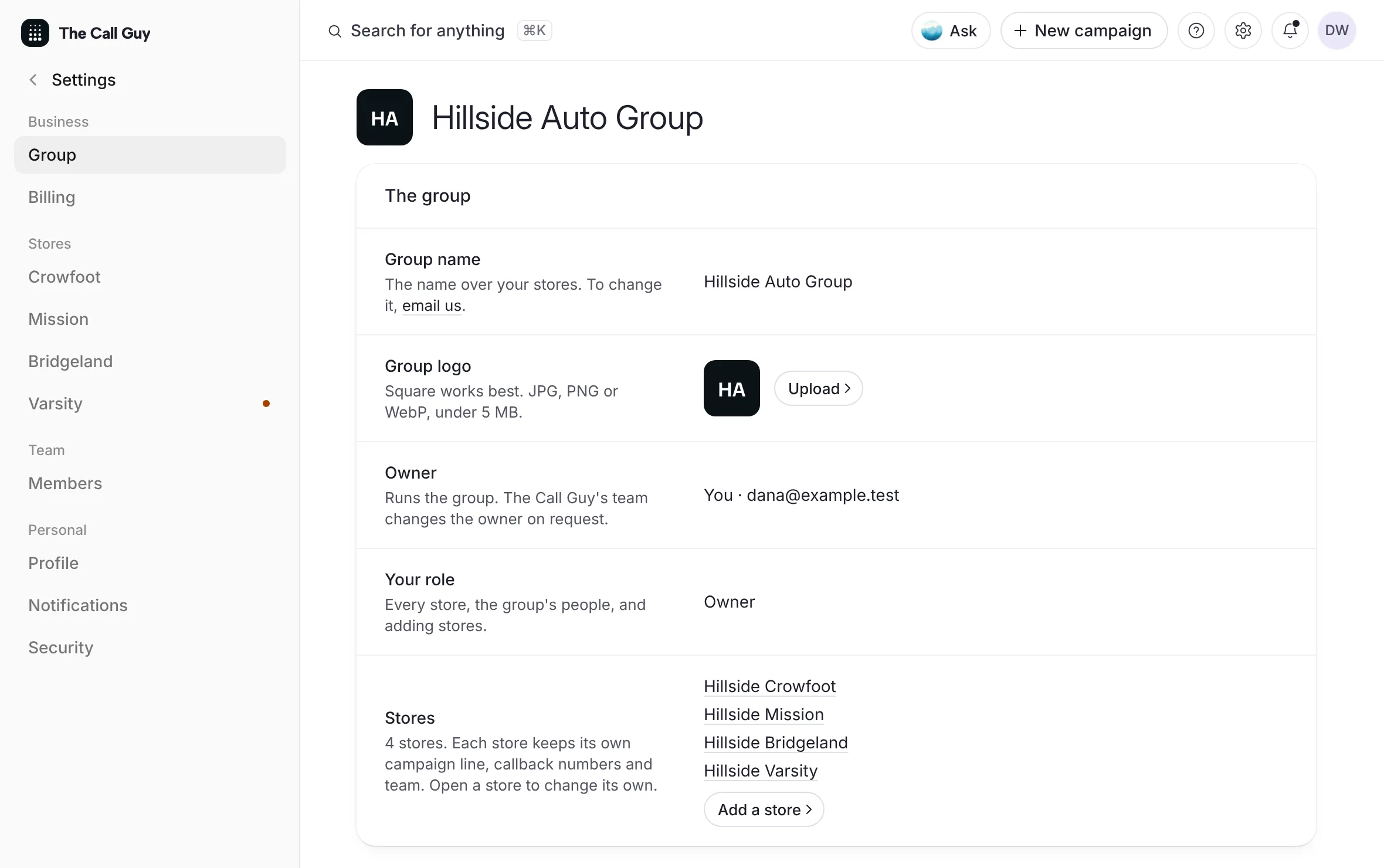 Example
What you see
your group's name as the title, then Group name, Owner, Your role and Stores. The Stores row lists the stores you can open and says "Each store keeps its own campaign line, callback numbers and team." The group's owner also sees Add a store on that row.
Good to know
A group holds up to 25 stores. Past that, the dashboard asks you to contact The Call Guy.
A group holds up to 50 people.
A login belongs to one group at most.
To rename the group, use the email us link on Group name.
The group's owner is changed by the team behind The Call Guy, on request.
A group is a view over the stores you can open, never extra access. Every figure you see comes from a store you could open on its own.
Related
Last updated October 19, 2026
Was this helpful?