A callback didn't ring my phone
A customer called your campaign line back and your phone didn't ring. The Callbacks log says what happened to each call, and what to change.
When a customer calls your campaign line back, the line rings your phones: one phone, or a ring group. The line never takes a voicemail itself. If your phone did not ring, the Callbacks log says what happened to that call.
Before you start
Your workspace owner or an admin chooses where callbacks ring. A Member can read the log but cannot change the phones.
Find the call
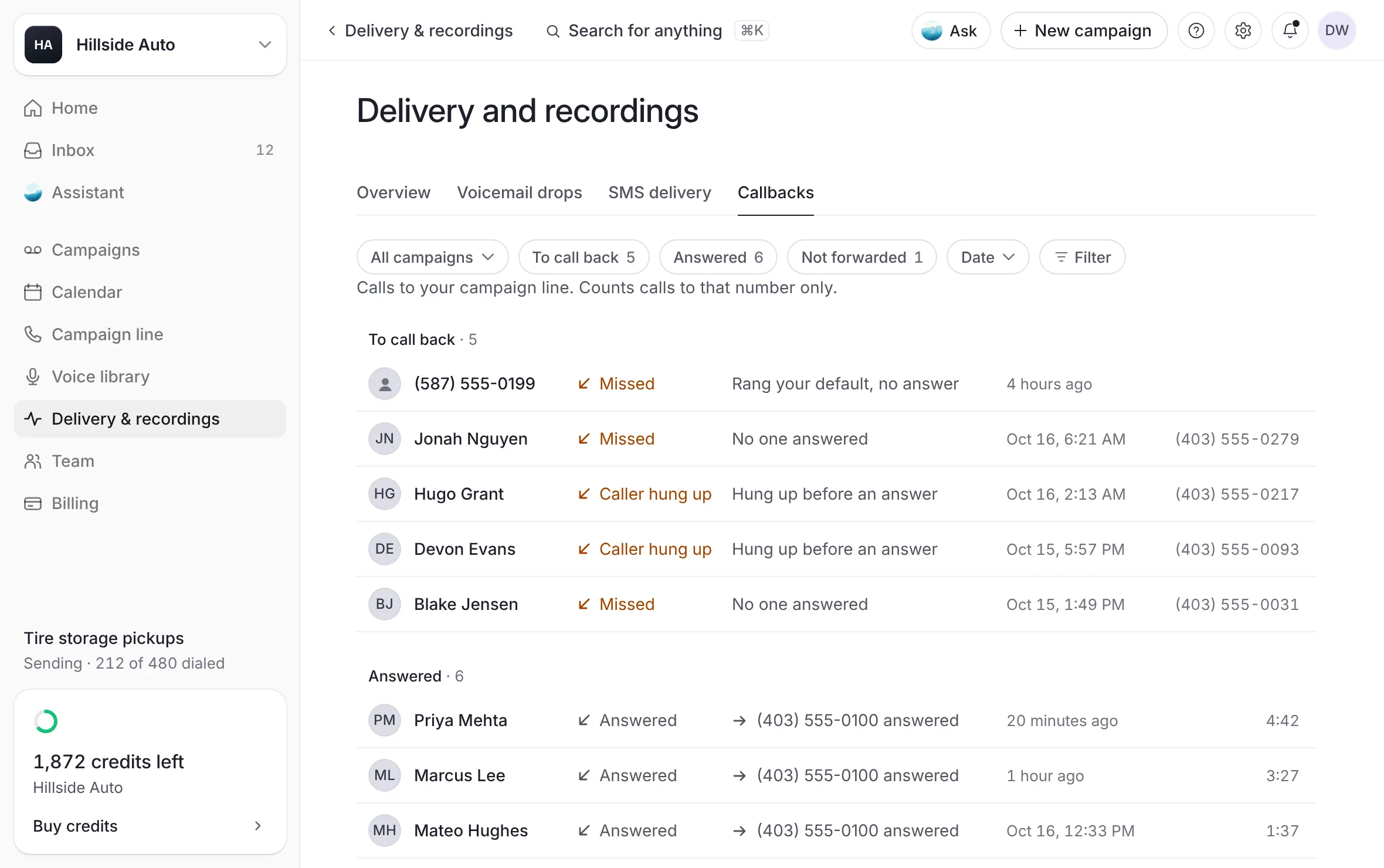
Open Delivery & recordings, then Callbacks.
Find the call. The Outcome column and the words beside it say what happened.
 Example
The log reads "Calls to your campaign line. Counts calls to that number only."
What each outcome means
| Outcome | What happened | What to do |
|---|---|---|
| Missed, "No one answered" or "Rang your default, no answer" | Your phone rang and nobody picked up. | Call the customer back. The call waits under To call back. |
| Caller hung up, "Hung up before an answer" | The caller left before the line could ring your phone. | Call them back if you know them. |
| Transfer failed, "Did not reach" and a number | The call could not be passed to that phone. | Check the phone with Call to check, below. |
| No number to ring, "No number was set" | No phone was set for that call to ring. | Add a phone and make it your default, below. |
| No number to ring, "The line was paused" | Your campaign line was not active when the call came in. | Check your line's status on Campaign line. |
When a call does not reach a phone, the caller hears a short message from the line with your business's name, telling them where to call.
Which phones a callback rings
Each callback rings what comes first in this order:
the phone or ring group the campaign that reached the caller chose under Callbacks ring, on the builder's When step, or later in the campaign page's Details;
otherwise, the phone the number they called is set to ring, when it has one;
otherwise, your default: your default ring group, or your default phone.
So check the campaign first: a campaign that picked an old number still rings it.
If your callbacks ring a ring group
In a ring group, whoever answers hears which campaign the callback is from (or your business's name, for a caller no campaign reached) and must press 1 to take the call.
Whoever answers has 10 seconds to press 1. A phone that answers and does not press 1 is hung up, and the group moves on to the next phone or ends.
A phone's voicemail never presses 1, so it never takes the call. With In order, the next phone rings instead.
When nobody presses 1, the caller hears a short message with a number to call, and the call is Missed.
A group rings each phone for the time set under Ring for (or Each phone rings for). A short ring time can end before someone reaches the phone.
To see how your group rings, run a test ring: on Campaign line, Callbacks, open the group's More button and select Try it. See One phone, or a ring group.
Check a phone and set your default
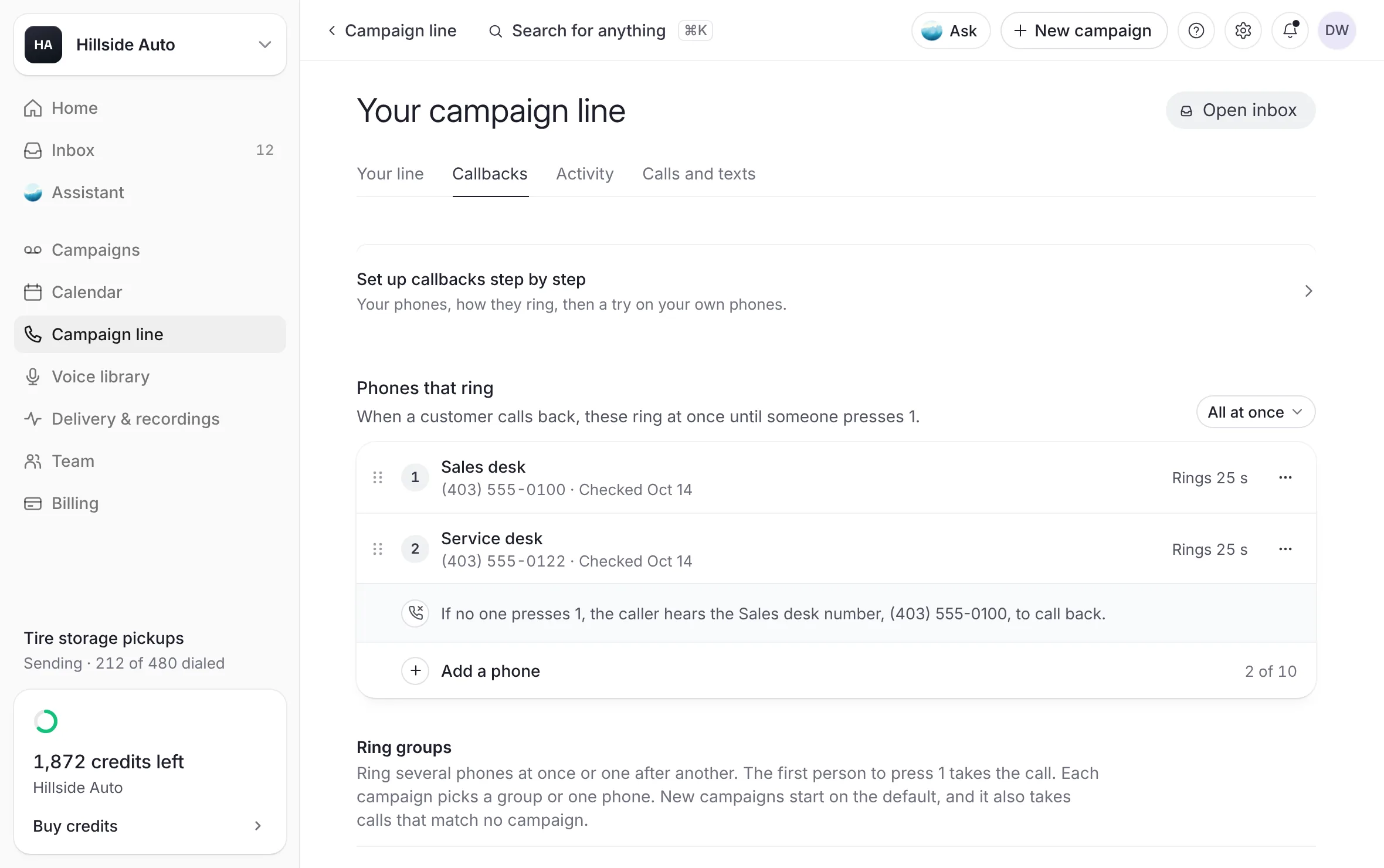
Open Campaign line, then Callbacks.
Under Phones that ring, find the phone. Its line reads "Checked" and a date, "Not checked yet", or Not checked.
Select Call to check on that phone, or in its menu. Answer the call and press 1.
To make it the phone that takes calls by default, select Make default in the same menu.
 Example
What you see
"Calling it now. If voicemail picks up, call again when someone can answer." Once you press 1, the phone reads "Checked" with today's date.
A phone's check is information, never a gate: an unchecked phone still rings.
To add a phone, fill in Name and Number under Add a phone, then select Call to check.
If your callbacks are set up outside the dashboard
Some lines read: "Your callbacks ring through a phone setup that's managed outside the dashboard, so changes here don't change which phones ring. To change who answers, talk to the team behind The Call Guy." On those lines, the phones in the dashboard change nothing. Write to the team to change who answers.
Good to know
Calls are never recorded.
To hear about missed callbacks, open Settings, then Notifications, and choose how you hear about A callback goes unanswered.
Related
Last updated October 19, 2026
Was this helpful?