What became of each follow-up text
Read the carrier's word on every follow-up text, see why a delivered voicemail got none, and find the replies and opt-outs.
When your campaign line sends a follow-up text after a delivered voicemail, the dashboard records what the carrier said about it. The page for this is called SMS delivery, under Delivery & recordings. It also holds the replies people send back and the people who opted out.
Before you start
Follow-up texts go out from your campaign line. Without one, the page says Your campaign line comes first, with Set up your campaign line. See What the campaign line is.
How the follow-up text is written, when it goes and who gets one is in The follow-up text.
The carrier's word
The carrier tells us whether it took a follow-up text. It never tells us the phone received it, so a follow-up text is never called delivered. Each one carries one of five words:
| Word | What it means |
|---|---|
| Sending | The follow-up text is queued or on its way to the carrier. |
| Accepted by the carrier | The carrier took the follow-up text. |
| No receipt | The carrier never said either way. |
| Not accepted | The carrier refused the follow-up text. |
| Not sent | The follow-up text was never handed to the carrier. |
The follow-up text is included with its delivered voicemail. It spends no credit of its own, whatever the carrier's word.
Why a delivered voicemail got no follow-up text
A Not sent follow-up text says why:
Landline: only mobile numbers get a follow-up text.
Called back first: they called your campaign line before the follow-up text was due.
Texted first: they texted your campaign line before it was due.
Had opted out: they had already opted out. See Opt-outs.
A returned voicemail never gets a follow-up text.
Open the page
Select Delivery & recordings in the sidebar.
Select SMS delivery, under it in the sidebar or in the tabs at the top of the page.
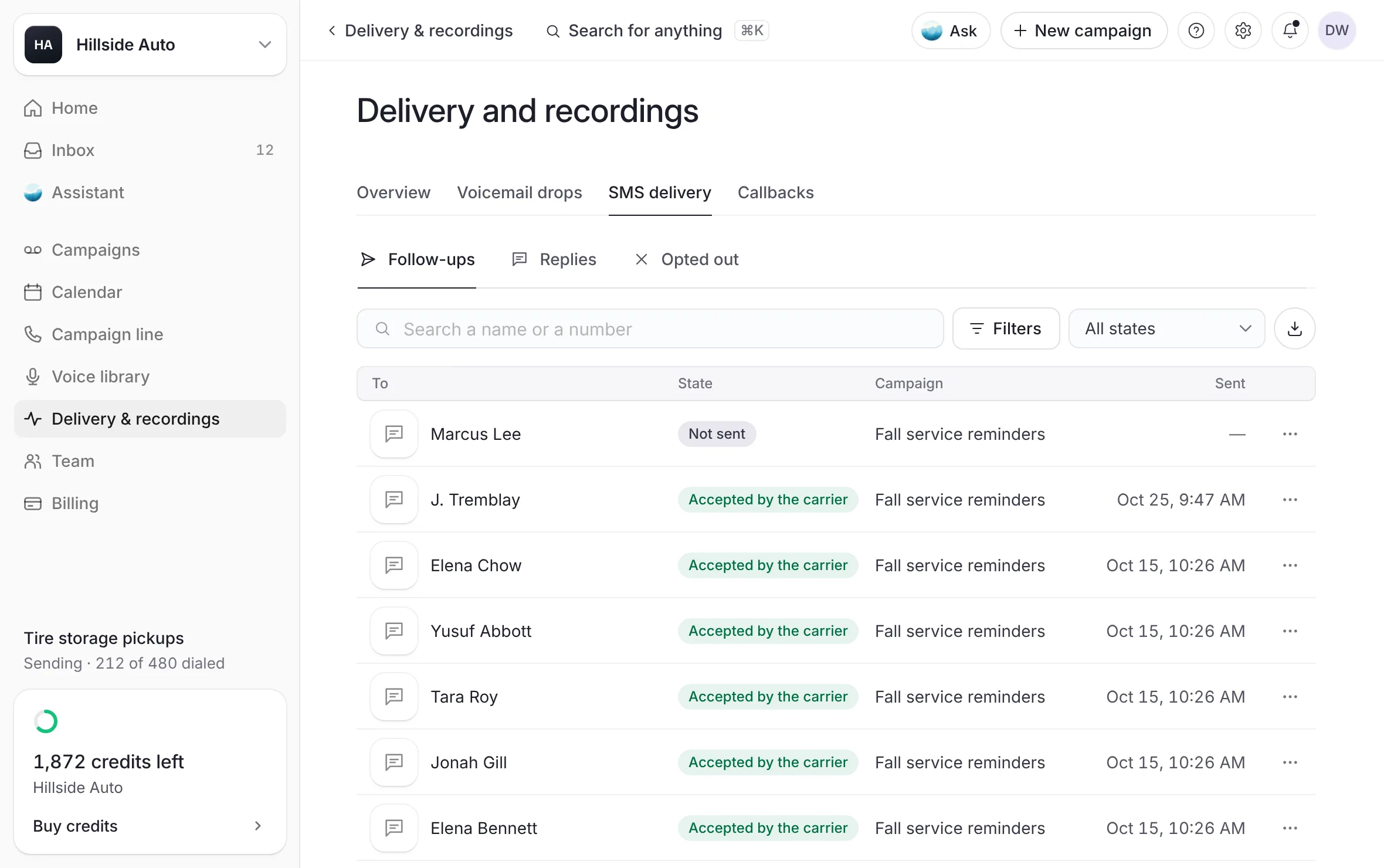 Example
What you see
a Filters column on the left and the log on the right. Above the log, three views: Follow-ups, Replies and Opted out. The log has To, State, Text, Campaign and Sent.
Follow-ups lists every follow-up text your campaigns sent, newest first.
Replies lists the replies people sent back and your team's answers, newest first.
Opted out lists the replies in which people opted out with STOP.
In the Text column, each row starts with what it is: "Follow-up", a reply from someone on your team, "Text-back" for the text after a missed callback, or "Their text". A text a person sent you reads Received, or Opted out when it was a STOP.
Narrow the log
In Filters, choose:
Timeframe: Last 30 days, Last month, Last 7 days, Last 3 months or All time, or Custom range…. The page opens on Last 30 days.
Campaign: All campaigns, or one campaign.
The carrier's word: All states, or one of the words above. Sending shows only while a follow-up text is on its way.
Why not sent: Landline, Called back first, Texted first or Had opted out.
Replies, with its count, opens the replies.
Or use Search a name or a number and the State menu above the log. The State menu and Filters set the same choice.
What you see
each choice in Filters shows its count, and the log shows only the rows that match.
Open one follow-up text
Select a row. Its More menu also has Open, Copy the number and Open the conversation.
What you see
a panel titled Follow-up text (or Reply, or Their text) with the person and the facts: To, Sent, The carrier's word, Campaign and From (your line's number), plus Why not sent or Came back when they apply. Under The message, the follow-up text as it was sent, with your store's footer. Activity lists its steps, from the delivered voicemail to the carrier's word and their reply.
Select Open the conversation to read and answer in the Inbox. See The Inbox.
Select a number to copy it.
Export the follow-up texts
Narrow the log to what you want.
Select Export these texts (the download button above the log).
What you see
a CSV file with Sent, Name, Phone, State, Why not sent, Campaign and Text, one row for each one that matches. A very long log exports its first part, and the notice after the export says how many it holds.
On a campaign's page
A campaign's own page reports its follow-up texts too, under Follow-up texts.
What you see
three cards. The carrier's word: the share the carrier accepted, with Accepted by the carrier out of those sent, No receipt, Not accepted, and Sending while some are on their way. Not sent: how many delivered voicemails got no follow-up text, by reason (Landlines, Called back first, Texted first, Had opted out). Replies: how many replies, from how many people, with Replied, Unread and Opted out. A line under the cards says when the text goes out.
Select a reason under Not sent to see those contacts in People on it.
Under the cards, Conversations lists the people who wrote back, each with a word: Unread, You replied, Read or Opted out. Every reply shows the rest of the list.
Select a conversation to read it beside the list: their Phone, whether they Called back, and the Conversation in order: the voicemail delivered (with what they heard), the follow-up text with the carrier's word, their replies and yours, and their calls back.
Select Reply to answer from your campaign line, in a panel beside the conversation. Someone who opted out has no Reply.
In People on it, each contact's row says what became of their follow-up text, such as "Text accepted", or "Replied" or "Opted out" for what the person did. See Every voicemail, and what each person heard.
Every callback figure on the page counts calls to your campaign line. Counts calls to that number only.
See A campaign's page.
Good to know
Every filter is kept in the page's address, so a copied link opens the same view.
On a phone, a View menu picks the view, and a Filters button opens the filters.
If a follow-up text you expected did not go out, see No follow-up text was sent.
Related
Last updated October 19, 2026
Was this helpful?