How the team reviews a campaign
Our team reviews every campaign before it sends, unless your store chose Send on my own. What happens after you submit, what we check, the three ways a review ends, and the Campaign review setting.
Nothing sends automatically. You approve the script, the voice and the schedule when you sign, and unless your store chose Send on my own, our team reviews every campaign before it goes out. This page follows a campaign from Submit for review to the end of its review.
After you submit
You sign on the builder's Review step and select Submit for review.
Your list uploads. The campaign reads Uploading until the last row lands.
The campaign moves to In review, and our team is told.
What you see
Your campaign's name and "is in review". Where it stands lists Submitted, In review, Approved and Sending, with "You'll get an email the moment it's approved." Three tiles say what happens next: We review it, It is scheduled and It sends in the calling hours.
While it is in review
Open the campaign from Campaigns.
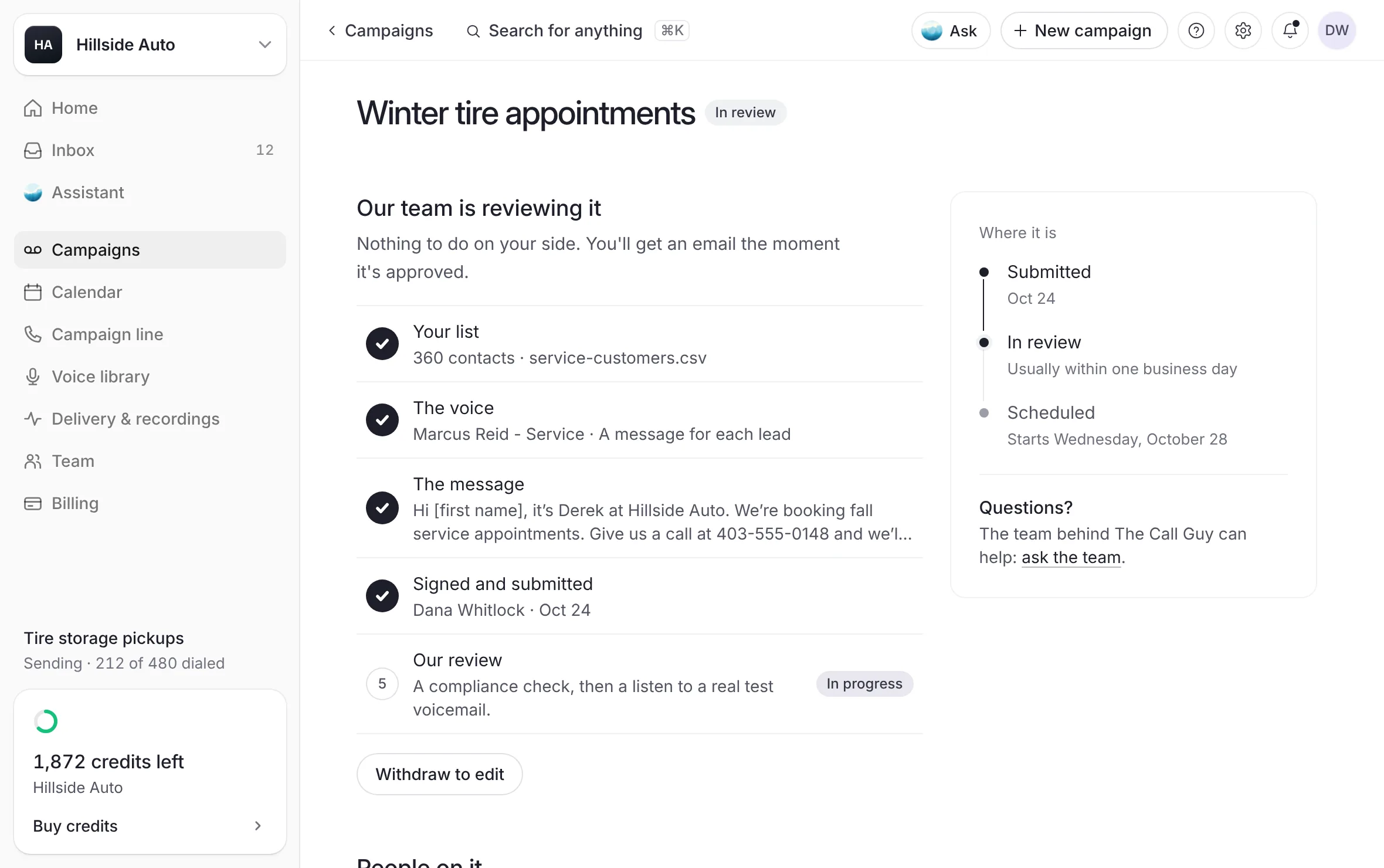 Example
What you see
Our team is reviewing it and "Nothing to do on your side. You'll get an email the moment it's approved." A checklist shows Your list, The voice, The message and Signed and submitted as done, and Our review in progress: "A compliance check, then a listen to a real test voicemail."
A review is usually done within one business day. Where it is shows Submitted, In review with "Usually within one business day", and Scheduled with the day it starts.
Nothing goes out while a campaign is in review, and nothing is spent. To ask about it, select ask the team under Where it is. Help opens with a note to the team, your question already started.
What we check
The script, word for word, and every detail it fills in from your list.
The voice and the message, by listening to a test voicemail.
That the script is truthful, identifies your business accurately and promotes nothing unlawful.
Before a campaign is scheduled, a person on our team records that they confirmed the time zone the campaign runs in, and the consent and local calling rules that apply to your contacts. A campaign cannot be scheduled until that record is complete, and nothing is delivered without it.
We decline, pause or cancel a campaign we reasonably believe breaks the law or our terms. See What the service won't be used for.
How a review ends
| Outcome | What changes | What you get |
|---|---|---|
| Approved | The campaign reads In production while the voicemails are made, then Scheduled. | An email saying it is approved, with its planned delivery. |
| A change asked | The campaign reads Needs changes, with our note on its page. | An email with our note. See Change or cancel a campaign. |
| Held | The campaign reads On hold, with our reason on its page. | The reason on the page. See Why a campaign is on hold. |
When the recordings are made and checked, you get an email that they are ready, and they open on the campaign's page under People on it. See The emails a campaign sends you.
Choose who reviews: Campaign review
Each store chooses under Campaign review, on its page in Settings:
The Call Guy reviews it first (every store starts here): our team checks your list, message and schedule before anything is sent, usually within one business day.
Send on my own: your campaign goes out at the time you pick, as soon as you sign it. You confirm consent and do-not-call checks yourself. Calling hours are always enforced.
Send on my own opens after your first campaign goes through our review; until then it shows greyed with that line. The account owner or an Admin turns it on once, with a short statement, their full name and a tick. Switching back is instant. A campaign already submitted keeps the path it was sent on, and the builder's Review step says which path the campaign you are signing takes. Members and Viewers see the setting but can't change it. If it reads "Set by The Call Guy", write to contact@thecallguy.ca to change it.
Good to know
The builder offers only starts at least two hours ahead, to allow for review.
A campaign you resubmit after a change is reviewed again from the start, usually within one business day.
Consent comes first explains what we ask of your list.
Related
Last updated October 20, 2026
Was this helpful?