On this page
- Where your balance shows
- What each figure means
- Read your credit activity
- What each row means
- Each row's menu
- Filter and search your activity
- Export your activity
- When your balance runs low
- Turn the low balance alert on or off
- A campaign bigger than your balance
- Who sees the balance and who can top it up
- Good to know
- Related
Your balance and credit activity
Where your credit balance shows, what each figure means, how to read, filter and export your credit activity, and what happens when the balance runs low.
Your balance is the credits you have left to spend. It shows in the sidebar, on Home and on the Credits page, and the Credits page keeps every movement of it, newest first.
Where your balance shows
The sidebar. Under the menu, a block labelled Credits shows your business name and your balance in credits, over a bar. Selecting it opens Billing.
Home. The Credits card shows your balance and a bar, with Available and how many credits you had at your last top-up. Last bundle shows the size of the last bundle you bought and its rate for each credit, or See billing before your first. The account owner also sees Buy.
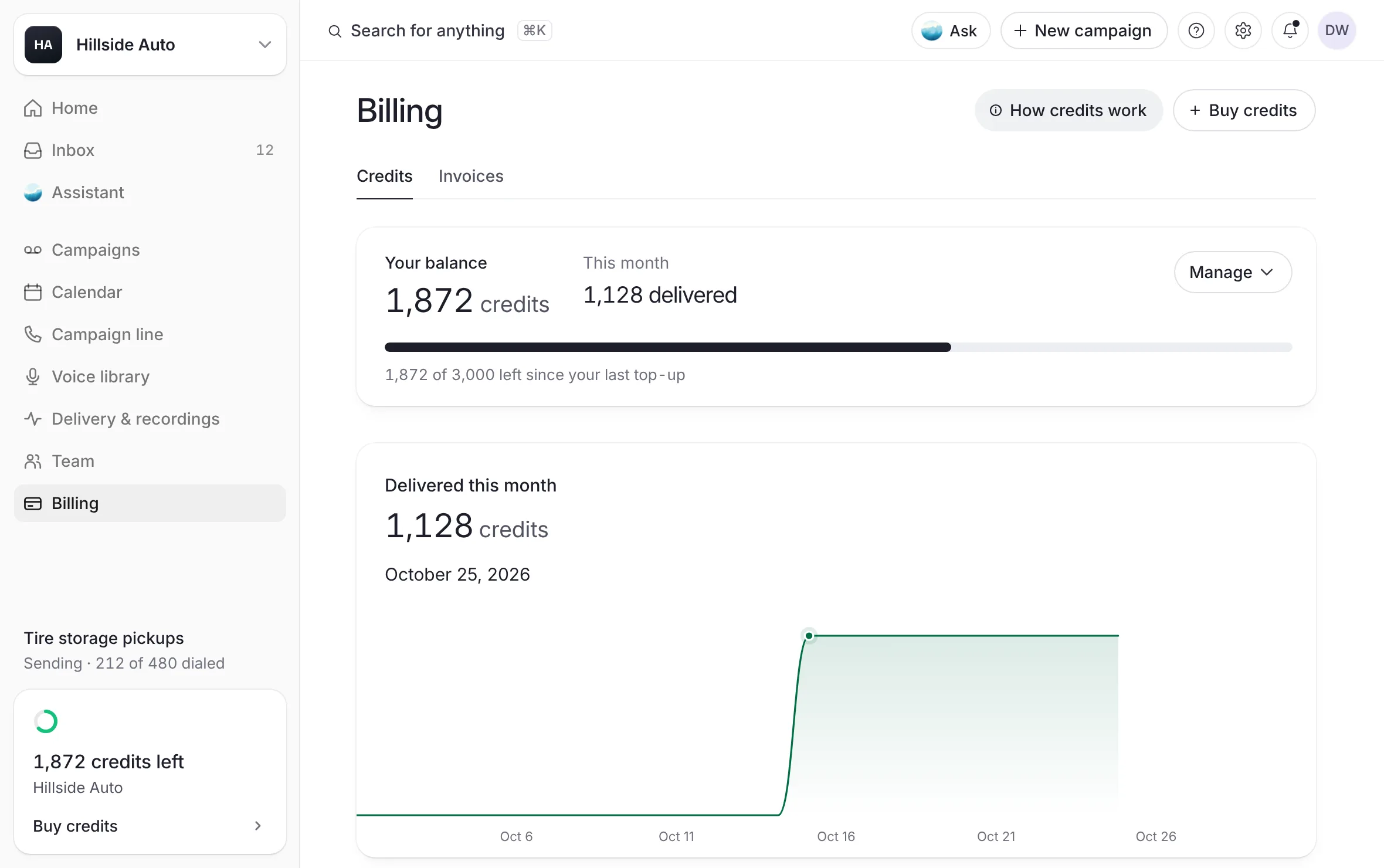
The Credits page. Open Billing in the sidebar. Your balance is the large figure at the top.
The campaign builder. Its review step checks your balance before you submit. See When credits run short.
 Example
What each figure means
On the Credits page:
Your balance: the credits you can spend now.
This month: the credits spent on delivered voicemails since the first of the month, as "… delivered". It reads "At least" a number when only part of the month could be read.
Delivered this month: the same month's credits as a chart, day by day. Move the pointer over the chart to read any day.
On the sidebar and the Home card, the bar shows how much of your balance is left since your last top-up. Hover over the sidebar's figure to read it as a sentence. With no top-up on record, the bar stays empty and the figure stands alone.
The bill on the right of the Credits page is your campaign line's invoice, not your credits. See Paying for your campaign line.
Read your credit activity
Open Billing in the sidebar. The Credits page opens.
Scroll to Activity, under the Delivered this month chart.
What you see
a table with Date, What happened, Credits and Balance after, newest first. Credits added show with a plus sign, credits spent with a minus sign. Balance after is what your balance was right after that row.
Only the newest rows show at first. Show all lists every row the page has read, and Show older entries reads further back when there is more. Before your first purchase, the table says "No activity yet. Your first bundle appears here the moment it's paid."
What each row means
| What happened reads | What it is |
|---|---|
| "Bought … credits", with the invoice number | A bundle you paid for. It appears once QuickBooks confirms the payment. |
| The campaign's name, or Voicemails delivered | Credits taken for that campaign's delivered voicemails. |
| The campaign's name with "misses returned", or Misses returned | Credits given back for voicemails that came back. These rows are from before October 11, 2026. Since then a credit comes out only after delivery, so there is nothing to give back. |
| Credits added by our team | Credits the team behind The Call Guy added, with its note. |
| A note, or Adjustment | A correction by the team. The note says what it was. |
Each row's menu
Some rows have a ⋮ key at the end. It holds only the places that row can take you:
Open the campaign on a campaign's row.
View the invoice on a bundle's row, and Download the receipt once that invoice is paid.
Filter and search your activity
The delivered chip above the table shows this month's delivered credits. Select it to list only this month's campaign rows. Select it again to list everything.
Date range starts on Any date. Its choices are Last 30 days, Last month, Any date, This month, This year and Custom range…, where you pick the first and last day. The table's heading names the range you chose.
The search key (Search activity) opens a search field over the rows.
When nothing matches, Clear filters puts the table back to every row.
Export your activity
On the Credits page, select Export CSV above the table.
Your browser saves a CSV file of the rows the table shows now, after any range, search or chip.
To export every row the page has read instead, open Manage, then Export CSV.
The file's columns are Date, What happened, Note, Change and Balance after. In the file, What happened names the kind of entry, such as "Bundle purchase" or "Campaign send", and Note carries the details.
When your balance runs low
"Low" means under 500 credits, the smallest bundle.
The sidebar adds Running low to the figure, or None left at zero.
The Credits page shows "Credits are low", with how many are left: "A campaign sends only what your balance covers; the rest waits until you top up." At zero it reads "You're out of credits": "A campaign is submitted only with credits on your balance." The account owner gets Buy credits in the notice. Home shows the account owner the same notice.
The bell tells the account owner "Your credits are running low", with how many are left, or "Your credits have run out", with Buy credits.
Turn the low balance alert on or off
Open Billing in the sidebar.
Scroll to Low balance alert at the foot of the page, or open Manage and select Low balance alert.
Turn the switch on or off.
What you see
a short message, "Low balance alert on" or "Low balance alert off". The line beside the switch reads "The bell tells you when your balance falls under 500 credits."
This is the same setting as Credits run low in Settings, under Notifications. See Email preferences.
A campaign bigger than your balance
In the builder's review step, when the list needs more credits than you have, a notice says how many credits your wallet is short. The account owner can buy a bundle that covers it from there, or submit anyway: the campaign sends what your balance covers, and the rest waits for a top-up. Your draft stays saved. See When credits run short.
With an empty balance, a campaign cannot be submitted.
While a campaign sends, it never goes past your balance. Contacts it cannot pay for wait, and an email titled "Your campaign is waiting on credits" goes to the account's email, with a Top up credits button. Once you top up, we send the rest.
Who sees the balance and who can top it up
| Account owner | Admin | Member | |
|---|---|---|---|
| Sees the balance, the activity and the invoices | Yes | Yes | Yes |
| Buys credits | Yes | No | No |
| Pays invoices | Yes | No | No |
| Gets the low balance alert in the bell | Yes | No | No |
A Member or an Admin sees Buy credits greyed out, with a notice: "Billing stays with the account owner: ask them to buy the bundle. The credits land on the workspace you share." Their Low balance alert has no switch. It reads "The bell tells the account's owner when the balance falls under 500 credits."
A dealer group can share one balance across its stores. That is covered in Billing across stores.
Good to know
Nothing tops up on its own. You choose when to buy a bundle.
If your balance or activity cannot be read, the page says Unavailable with Try again. It never shows zero in its place.
On the Credits page, a balance below zero, after a correction by the team, shows as zero.
Related
Last updated October 19, 2026
Was this helpful?